 TransPlay
The classics you couldn't read, now you can play and read
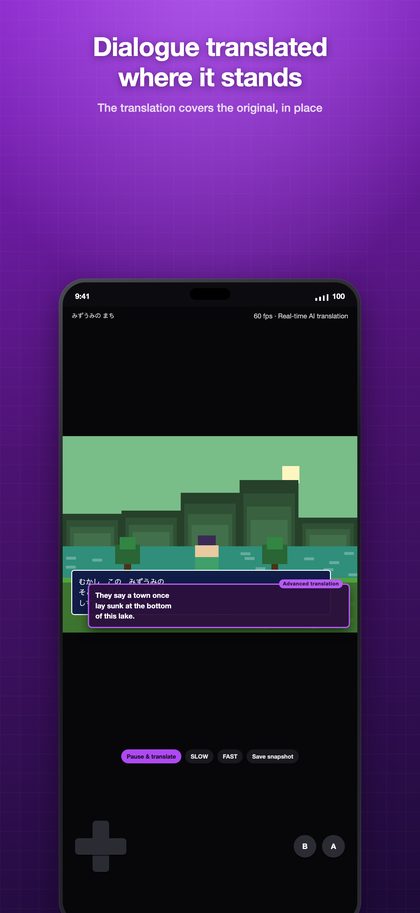
The app reads the dialogue on screen and lays the translation right over it. 12 consoles, 14 languages.
How it works
Three steps, all inside the game. You never leave the app.
It reads the screen
Text is recognized exactly where it sits. Every console draws its font differently, so the recognition settings are tuned per console rather than shared.
AI translates it
On your device for free, with an AI model you download, or on a dedicated server — you choose. The server comes back in under a second.
It covers the original
The translation lands where the original text was. No dictionary in the other hand, no walkthrough on a second screen.
One console, one app
TransPlay doesn't cram 12 consoles into one app. There's one reason: to build each app around the one game you're playing, so it can be optimized for that alone.
Tuned for that console only
Core, aspect ratio, controller layout, translation area and text recognition are all set for that console. No compromises made for another one.
Light and fast
No other console cores on board, so the app is small, starts fast, and the library holds only that console's games.
Only what you need — still one thing
Get just the app for the console you play. Play several? One All-Pass unlocks Pro in all 12 apps.
Consoles
One app per console. Get only the one you actually play.
 Game Boy Advance51 game packs
 Game Boy50 game packs
 NES · Famicom50 game packs
 SNES · Super Famicom50 game packs
 Mega Drive · Genesis50 game packs
 PlayStation · PS150 game packs
 Sega Saturn50 game packs
 Dreamcast50 game packs
 PlayStation Portable · PSP50 game packs
 PC Engine · TurboGrafx-1650 game packs
 WonderSwan50 game packs
 Game Gear50 game packs
Pricing
Translation works for free. A subscription buys better translation and the conveniences around it.
Free
On-device basic translation, the full emulator, save states. No account needed.
Solo
Every Pro feature in one app — on-device AI and server translation, translation areas, cloud backup, turbo, statistics.
All-Pass starts with 7 days freeAll-Pass
Pro across all 12 apps. Buy it in any one of them and the other eleven unlock too.
All-Pass starts with 7 days freePrices are shown in your local currency inside the app. Subscriptions renew automatically and can be cancelled any time in your account settings.
Frequently asked
Does it come with games?
No. No game files (ROMs or disc images) ship with the app, and we do not point you to any. Use only files you legally own.
How do I get my games in?
Wi-Fi import is the easiest: open the address the app shows in your computer's browser and drag the files in. No cable, no iTunes. You can also share from the Files app, or pull them straight from another of your devices on the same Wi-Fi.
Is it really real-time?
From reading the text to covering it with a translation is under a second on the server engine. On-device translation takes a little longer but needs no internet. When dialogue runs past too fast, Freeze & Translate holds the frame so you can read at your pace.
Does it work offline?
Yes. Basic translation and the on-device AI model both run without internet, and nothing from your screen leaves the device. Only the server engine needs a connection.
Why do I need a BIOS?
PS1, Saturn and Dreamcast cannot boot without the console's BIOS file. That file is Sony's and Sega's copyrighted code, so it cannot ship with the app — dump it yourself from hardware you own. Every other console runs with no BIOS at all (Mega Drive and PC Engine need one only for CD games).
Why is it split into 12 apps?
So that each app can be optimized for that console's games alone. Core, screen, controller and translation settings differ per console, and one app holding all of them would be complete for none. Get only the app you play, and if you play several, one All-Pass unlocks all 12.
Do I have to buy all twelve?
No. Get the app for the console you actually play. All-Pass exists for people who play several, and buying it in any one app unlocks the other eleven — with no account to create.
What languages is the app itself in?
English · 한국어 · 日本語 · 简体中文 · 繁體中文 · Español · Français · Deutsch · Italiano · Português (Brasil) · ไทย